Follow every link in an email to where it really lands
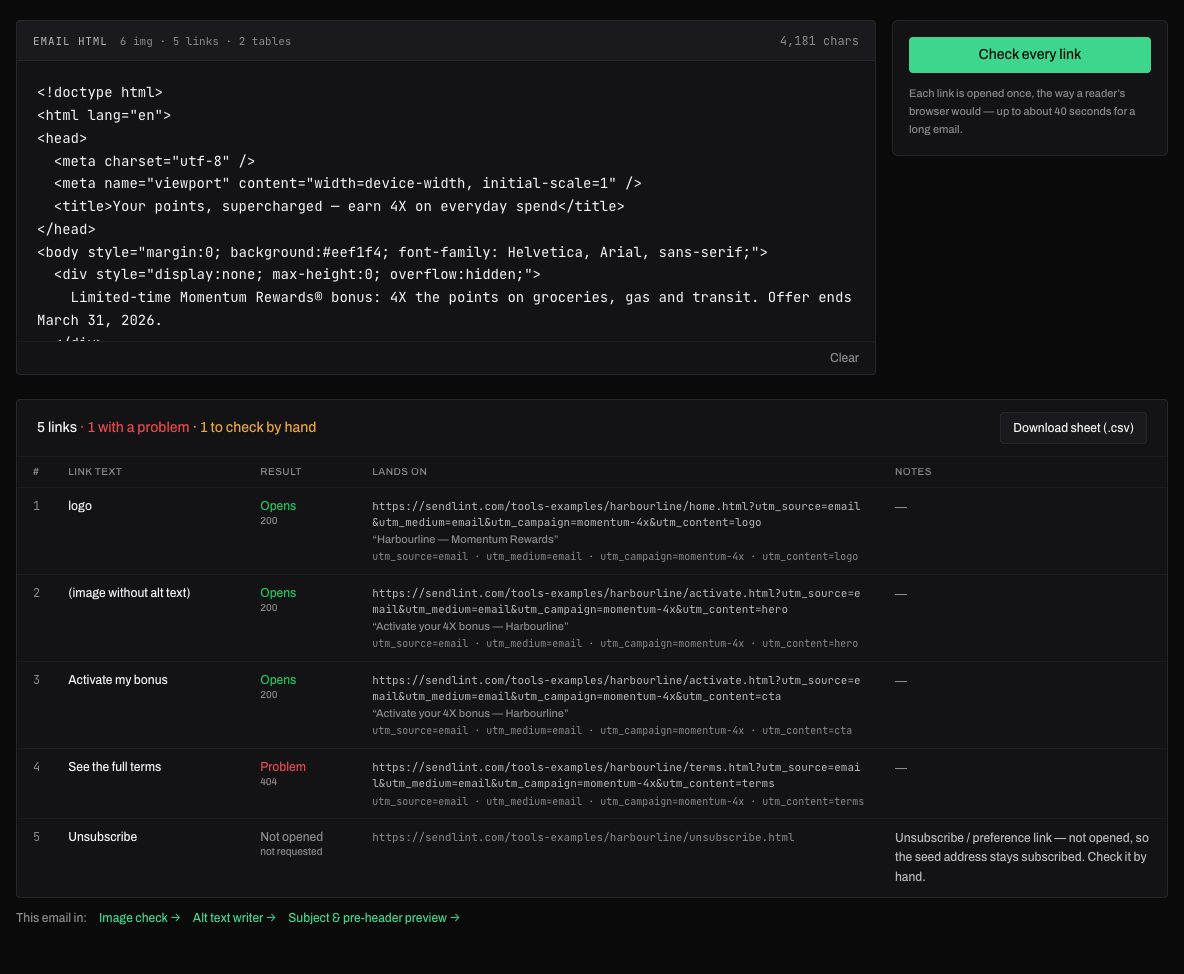
A link can return a page and still be wrong: a 404 behind a redirect, a staging site, tracking parameters that went missing. The Link sheet opens each link the way a reader's browser would and lists what it found.
What you get
- Status, final URL after every redirect, and the landing page's title
- Tracking parameters (utm_*) read from where the link ends up
- Error pages, placeholder pages and test sites called out
- Unsubscribe links listed but never opened, so a test address stays subscribed
How it works
- Paste the email's HTML, drop the .html or .eml file, or paste a preview URL.
- Press Check every link — each link is opened once.
- Read the sheet, or download it as a CSV for the developer.
Why links break after the build looks fine
Every link in a marketing email is a promise about a page somewhere else, and the page is the one thing the email cannot control. The build passes review, the preview renders, and the link still fails, usually for one of these reasons:
- The tracker in front of it. SFMC, Marketo, Braze and most platforms rewrite every href at send time into a click-tracking address that redirects to the real page. The HTML you reviewed had the real URL; the recipient gets the wrapped one, and the wrapper can be wrong, expired or missing a parameter.
- A 404 behind a 302. The redirect works, so a shallow check reports success; the page it lands on does not exist.
- A page that loads and says "page not found". Many sites answer 200 for a missing page and print the error in the body. A status check passes it; a reader does not.
- A staging or test site. The developer built against staging.brand.com and one link never got swapped. It opens fine on the agency's network and on nobody else's.
- Tracking parameters that went missing. utm_campaign is on the link in the email and gone by the time the redirect chain finishes, so the campaign reports nothing.
- A link that is right in English and wrong in French, or that points at last quarter's landing page because the URL was copied from the previous campaign.
- An empty href, a #, a mailto: where a page was meant, or an address that is relative to nowhere.
None of these show up in a rendering preview, and most of them are invisible to a status-code checker. They show up when somebody opens every link the way a reader would and looks at where it landed.
What the Link sheet checks, link by link
The Link sheet reads the HTML, finds every link, and opens each one once, following every redirect to the final page, the way a reader's browser would. For each link it records:
- The link text, or what stands in for it: "(image without alt text)" when a picture is the link and nothing names it.
- The result: Opens, Problem, Not opened, or could not be checked, with the HTTP status beside it.
- Where it lands: the final URL after the whole redirect chain, and the landing page's own title, so a wrong page is obvious at a glance.
- The tracking parameters read from the final URL: utm_source, utm_medium, utm_campaign, utm_content and the platform-specific ones (sfmc_id, et_rid, mc_cid, gclid, fbclid and others).
- Notes in plain words: that the link goes through a tracker before landing, that the page loads but is an error page or a placeholder, that the domain is a test or staging site, that an address is not a full http(s) link.
Unsubscribe and preference links are listed with everything the sheet can tell without opening them, and are never requested, because one request can unsubscribe the seed address the test was sent to. mailto: and tel: links are listed as what they are. When a site answers a checker with a challenge page instead of the content, the sheet says the link could not be checked rather than calling it fine; some corporate sites behind a CDN never answer an automated request, and a false pass there is worse than an honest blank.
When most links pass through the same tracker, the sheet says so once instead of on every row, and the Download sheet button gives the developer the whole table as a CSV: number, link text, result, status, final URL, parameters and notes.
Links against the copy deck
Opening every link tells you whether it works. It does not tell you whether it is the link the client approved. That is the second check, and it needs the copy deck: the links table in the deck says which page each button, logo and footer link should go to, and the email either matches it or does not.
In SendLint's full analysis the Links vs Deck check reads that table and compares it with the email in both directions: every deck link should be in the email, on the element the deck names, and every email link should be accounted for by the deck. The usual catches are a logo the deck links and the build left unclickable, a CTA pointing at the generic page instead of the campaign one, and a footer link that still carries the previous campaign's parameters.
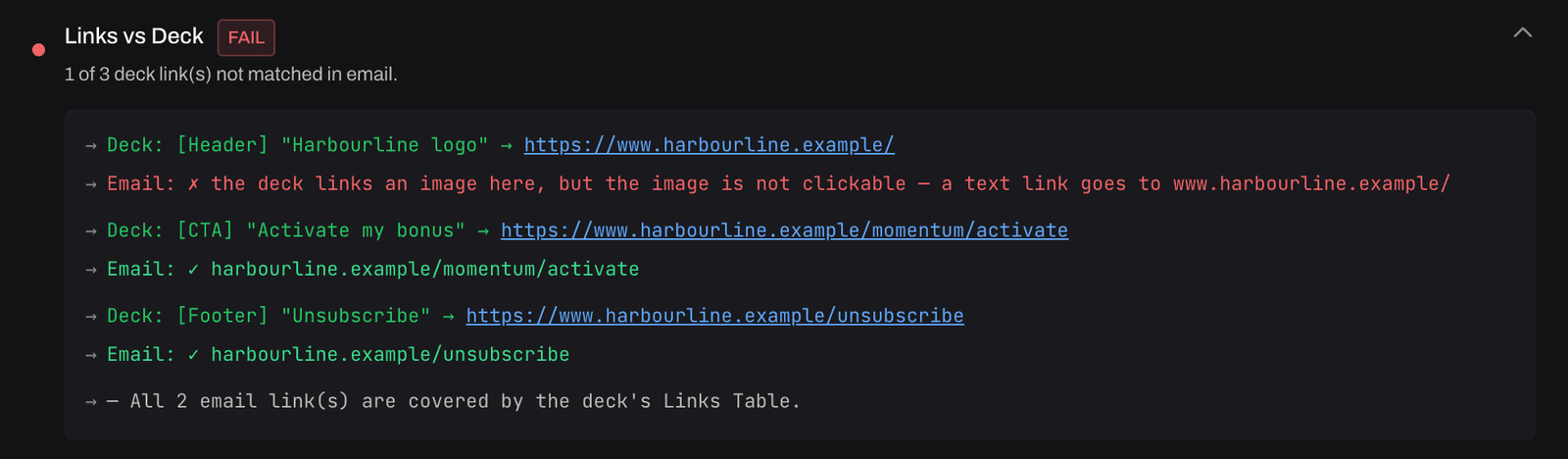
How the deck is read and matched is in the copy deck comparison guide and Prepare a deck tool.
Checking links in a test send from SFMC, Marketo or Braze
Check the test send, not the build. The platform rewrites every link at send time, so the HTML in the content builder is not what the recipient gets. Open the test email in Outlook on the web or Gmail, save it as an .eml (or view the message source and copy it), and drop that file on the Link sheet. Every wrapped link is followed through the tracker to the real page, and the parameters are read from the end of the chain, where they count.
Two things to look for in a test send that a build never shows: a tracker that strips or rewrites the campaign parameters, and a link the platform left unwrapped because it sat inside a block the tracker does not read (a VML button, a conditional comment, a link built from a personalisation string). A link with no tracker in front of it, in a send where every other link has one, is a link the platform will not count.
The whole pre-send routine for Salesforce Marketing Cloud is in the SFMC pre-send verification guide.
A link checking routine that takes five minutes
- Run the sheet on the test send, not the build, for every version and every language.
- Read the Lands on column first: the final URL and the page title. Wrong page, old campaign, staging domain and placeholder pages are all visible there before any status matters.
- Read the parameters: every tracked link should carry the campaign's utm set, and utm_content should differ by placement (logo, hero, CTA, footer).
- Open the unsubscribe and preference links by hand, from the seed inbox, and confirm the page is the client's and in the right language.
- Compare the sheet with the deck's links table, or let the full analysis do it, and send the developer the CSV with the rows that need a change.
The Link sheet is one of six single-purpose tools from SendLint's email QA workflow. In a campaign, the same checks run on every email in every round, next to the copy, creative, accessibility and rendering checks, and the findings carry from round to round until they are fixed.
Related: the email QA checklist, the image checker and run one email through the full analysis.
Frequently asked questions
- Why isn't the unsubscribe link opened?
- Opening it can unsubscribe the address the test was sent to. It is listed so you can check it by hand.
- Does it follow tracking redirects?
- Yes — every redirect, to the final page, and the sheet says when most links pass through the same tracker.
- What counts as a problem?
- A link whose final page answers with an error (404, 410, 5xx), a page that loads but says "page not found" or "coming soon" in its own words, a staging or test site, and an address that is not a full http(s) link. A tracker in front of the link is a note, not a problem.
- Does it check UTM parameters?
- It reads them from where the link ends up, after every redirect, and lists them under the link. That is where they count: a tracker that drops utm_campaign on the way through shows an empty row where the parameter should be.
- Can it check links in a Salesforce Marketing Cloud or Marketo test send?
- Yes. Drop the .eml from the test send, or paste its HTML. The tracking wrappers the platform added at send time are followed like any other redirect, so you see where each wrapped link really lands, which is what the recipient gets.
- Is the email stored?
- No. The HTML is read once to find the links, each link is opened once, and the sheet is yours to download. Nothing is kept.
More tools
The tools are part of SendLint, which checks every email in a campaign against its copy deck and creative — every version, both languages, every round. See SendLint.