Comparison · October 2026
An Email on Acid alternative for email QA: verify the email, not just preview it
First, the name: Email on Acid is now Mailgun Inspect. Its site calls Inspect the next generation of Email on Acid’s quality assurance tools, under Sinch, and the product is the same idea: previews across 100+ clients and devices, accessibility and spam content checks, image validation. If you are searching for an Email on Acid alternative, the honest first question is which half of the job you need.
Email on Acid is built around rendering: showing you what the email looks like in each inbox. SendLint is built around verification: proving the email matches what was approved, in every language, with every link landing where the deck says, and making sign-off itself checkable. Different jobs. This page compares the two on the work an email QA team actually does, puts both price lists side by side, and ends with a plain recommendation.
Where Email on Acid is strong
Credit where due: Email on Acid was one of the two tools that made client preview testing a normal step, and Mailgun Inspect keeps that strength. Previews on 100+ clients and devices come back in seconds, the accessibility test is checked against WCAG 2.2, the spam content analysis covers the major providers, and image validation catches the broken and oversized files. Unlimited users on every plan means the whole team can look at a result without buying seats. If your emails break in obscure client and device combinations and your main QA question is “how does this render in each inbox?”, it answers that well.
SendLint does not try to replicate a preview farm. It renders the one client that defines the category, desktop Outlook, for real, on its own machines, and simulates the rest in Chromium with pixel diffs between rounds.
What a rendering preview can’t tell you
In agency and regulated email programs, the incidents that reach the client or legal are rarely rendering bugs. They look like this:
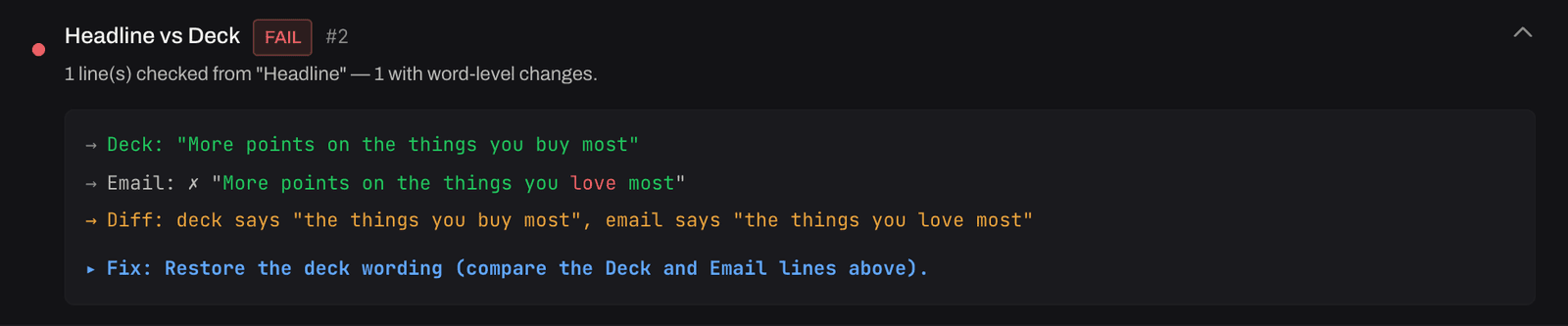
- A promo rate or a date that differs from the approved copy deck by one character.
- A disclosure present in the English version and missing from the French one.
- A link that lands on last quarter’s page behind its tracking wrapper, so it validates fine.
- A headline the designer drew into the hero image and the developer never typed, so it was never checked.
- A build quietly edited after sign-off, with the approval still attached to the old file.
A preview shows you the email. It cannot show you the email against its sources of truth: the deck, the creative, the brand rules, the previous round. That is the job SendLint was built for, and the one most teams still do by eye, line by line, on a Friday afternoon.
Email on Acid vs SendLint, job by job
| Job | Email on Acid / Mailgun Inspect | SendLint |
|---|---|---|
| Client rendering previews | Previews on 100+ clients and devices, results in seconds; its core product | Real desktop Outlook (the Word engine) rendered on SendLint's own machines, plus Chromium at every viewport with round-over-round pixel diffs and Outlook-risk flags |
| Copy vs the approved deck | Manual: reviewers read the email beside the deck | Automated line-by-line comparison against the copy deck (.docx, .pdf, .xlsx), both directions, in any language |
| Creative vs the approved design | Manual visual review | Block-by-block comparison against the approved PDF, PNG, JPG or Figma export, with the AI Agent reading words inside pictures |
| Links and images | Link and image validation: broken links, image problems | Every link followed through its tracker to the final page and compared with the deck's intended destination; UTM parameters checked; image weight, retina sharpness, format and alt text |
| Accessibility | Accessibility testing against WCAG 2.2 | WCAG 2.1 AA pass: contrast and colour-blind simulations, alt text presence, quality and language, heading order, table roles, font-size floors, link text |
| Spam and deliverability | Content spam analysis across major providers, inbox provider compatibility | Content scoring, image-to-text ratio, trigger phrases, authentication readiness; no inbox provider seed testing |
| Multilingual campaigns | No language-specific pass | Per-language deck columns, language-leak detection, right-to-left layout, French typography and currency rules, alt text in the wrong language |
| Fix tracking across rounds | Re-run the test on the new build | Findings tracked from FAIL to FIXED to VERIFIED FIXED across rounds, with waivers and their reasons on record |
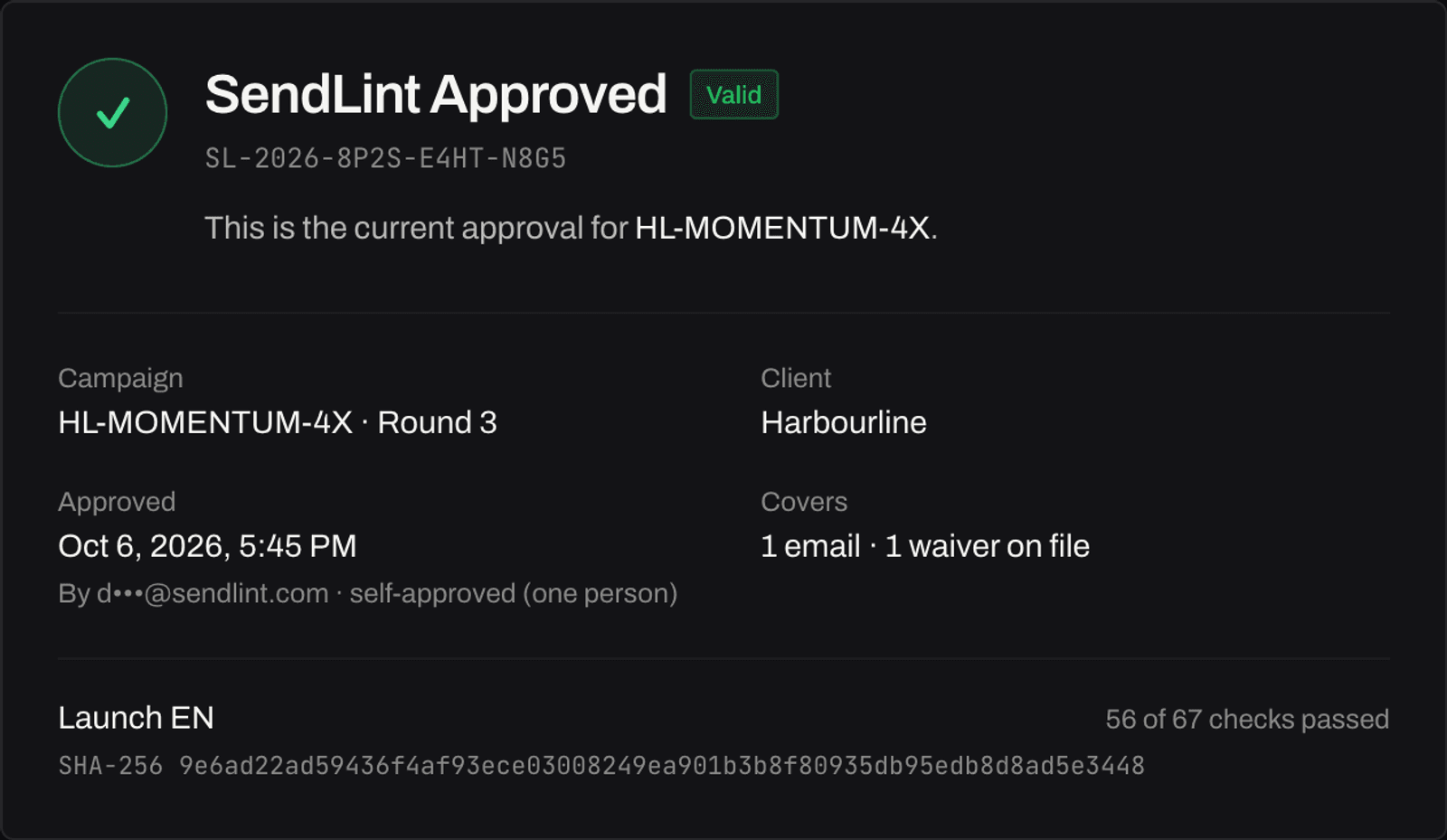
| Proof of what was approved | None; approval happens outside the tool | A certificate binding each approved email to its SHA-256 hash, a public verify page, and an API gate the ESP can call before sending |
| Who pays | Per plan, unlimited users, previews metered (1,000 or 2,000 a month, then $0.15 each) | Per Member (the people who run QA); Reviewers who read, comment and approve are free and unlimited; no metering |
Email on Acid / Mailgun Inspect capabilities summarised from its public product and pricing pages in October 2026; verify current features with the vendor, as products change.
What sign-off looks like in each
In Email on Acid, a passed test is a result on a screen; approval happens somewhere else, in an email thread or a project tool. That is fine for a marketing team that owns its own sends. It is thin for an agency that has to prove to a client, months later, exactly what was approved, by whom, and that the file the ESP sent was that file.
SendLint’s sign-off mints a certificate. It names the campaign, the round, the client, the approver, every email covered and its SHA-256 hash, and the checks that passed and were waived. Anyone with the link can paste the sent HTML into the public verify page and get a yes or no in the browser; an ESP automation can ask the same question through the API before the send goes out.
Pricing, side by side
Both publish their prices, so here they are, as listed in October 2026. They are not priced for the same job, which is the point.
Inspect Premium ····· $199/mo · unlimited users · 2,000 previews/mo · $0.15 each after
Inspect Contract ···· custom
SendLint ············ $988/mo per Member · $799/mo annual · Reviewer seats free
SendLint demo ······· free · one email · no account
Inspect is priced as a tool a marketer subscribes to, metered by preview. SendLint is priced as the QA pass: a Member seat replaces the hours a QA analyst or producer spends reading the email beside the deck, clicking every link, and chasing the French version, on every build of every campaign. Everyone who only needs to read the report, comment and approve (account managers, clients, designers) is a free Reviewer, and nothing is metered.
Which one should you pick?
- Pick Email on Acid / Mailgun Inspect when your QA bottleneck is rendering coverage: many clients, many devices, template developers iterating fast, and nobody downstream asks you to prove the copy matched the deck.
- Pick SendLint when your bottleneck is verification: campaigns checked against approved decks and creative, multilingual sends, multi-round fix cycles, and clients or compliance teams that expect provable sign-off. This is most agencies and every regulated program.
- Run both when you have both problems; they barely overlap. Inspect on the template while it is being built, SendLint on every campaign build before it goes to the client.
What switching actually involves
There is nothing to migrate. SendLint reads the files you already have: the email HTML (or the .eml from a test send), the copy deck as the writer delivered it, the approved creative as a PDF or image, and the brand guide as a PDF, from which it extracts the rules once per client. A campaign goes in as a folder of versions; the report comes back in about ten seconds per email with every finding quoting the deck line and the email line in full. You can do the same with one email, no account, on the demo.
The same comparison against the other preview tool is on the Litmus alternative page.
Frequently asked questions
- Is Email on Acid still a product?
- The product continues as Mailgun Inspect, which its site describes as the next generation of Email on Acid's email quality assurance tools, under Sinch. The previews, accessibility checks, image validation and spam content analysis are still there; the plans are Basic, Premium and Contract. This page uses both names because people still search for Email on Acid.
- Is SendLint a replacement for Email on Acid?
- For teams whose main need is previewing renders across 100+ clients and devices, no: that is what Email on Acid, now Mailgun Inspect, is built for. SendLint replaces the verification half of the workflow: proving the email matches the approved deck and creative, following every link to its real destination, tracking findings across fix rounds, and certifying sign-off. Some teams run both.
- How much does Email on Acid cost compared with SendLint?
- As published in October 2026, Mailgun Inspect lists Basic at $99 a month (1,000 previews) and Premium at $199 a month (2,000 previews), both with unlimited users and $0.15 per preview beyond the allowance, plus a custom Contract tier. SendLint is $988 per Member a month, or $799 a month billed annually, with unlimited free Reviewer seats. They price different jobs: a preview tool, and the QA pass itself.
- Does SendLint show email client previews?
- SendLint renders your email in real desktop Outlook (the Word engine) on its own render infrastructure, plus Chromium screenshots at every viewport with round-over-round pixel diffs and Outlook-risk flags. It does not run a 100-client preview farm. If the client you worry about is Outlook, SendLint renders the real thing; if you need a screenshot from every client before every send, keep a preview tool for that.
- Which should an agency pick?
- If the bottleneck is rendering coverage across many clients, pick the preview tool. If the bottleneck is proving every version in every language matches what the client approved, with sign-off a client or compliance team can check later, pick SendLint. Agencies with both problems run both; the overlap between them is small.
Keep reading
- A Litmus alternative for email QA: verify the email, not just preview itRendering previews and verification are different jobs. An honest side-by-side of which tool fits which one, with both price lists.
- The email QA checklist: every check before you sendEvery check a bank-grade email QA pass covers, why each exists, and which ones humans consistently miss.
- How to QA an email against the copy deck, line by lineThe shapes a deck arrives in, both directions, per version and per language, the parts everyone skips (subject line, alt text, links, tokens), what counts as different, and what to do when the deck is revised mid-campaign.